





The Future of XLR Audio Interfaces: Wireless Integration and Smart Controls
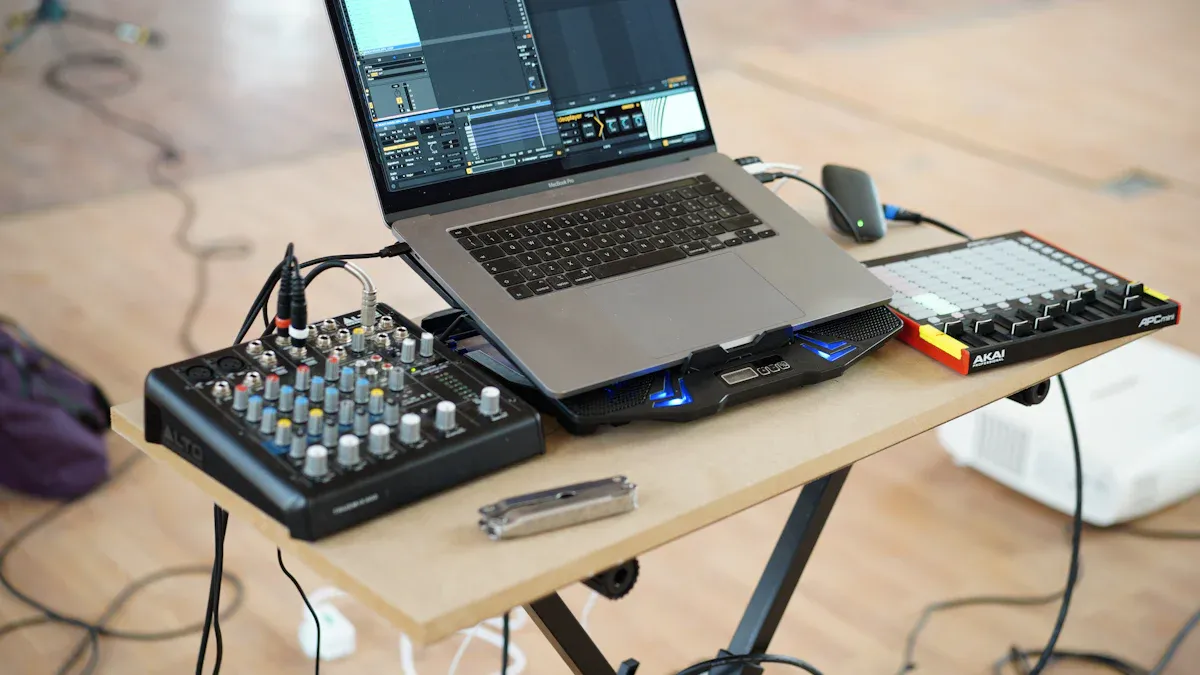
Wireless integration and smart controls now transform XLR Audio Interfaces, delivering flexibility, workflow efficiency, and creative power. Audio professionals experience superior sound quality with XLR microphone connectors, easy setup using Swivel XLR connectors, and versatile XLR male connections. Recent products like the ROXTONE Wireless XLR System show rapid adoption.
| Metric | Details |
|---|---|
| Wireless & Smart Control Market Segment (2028 Projection) | USD 266.87 million |
| CAGR for Wireless & Smart Controls (up to 2028) | 6.0% |
Key Takeaways
- Wireless XLR audio interfaces boost mobility and reduce cable clutter, making setups faster and workspaces safer for audio professionals.
- Smart controls enable remote adjustments and real-time monitoring, improving workflow efficiency and reducing manual errors during recording or live events.
- Despite advances, challenges like latency, compatibility, and interference remain, so proper setup and training are essential for smooth operation.
XLR Audio Interfaces: Overcoming Traditional Limitations
Cable Dependency and Mobility Challenges
Audio professionals often face mobility issues when working with XLR Audio Interfaces. Xlr Cables provide balanced connections and help reduce noise, butlonger cablescan introduce problems. Signal attenuation, increased capacitance, and resistance can degrade sound quality. Long cables also make setups more complex and time-consuming. Technicians must manage cables carefully to prevent interference and signal loss. Maintenance becomes a challenge as cables bend, stretch, or face environmental exposure. These factors can cause failures and require extra attention during setup. In live or studio environments, long cable runs may even introduce latency, affecting synchronization. Proper cable management is essential, but it limits flexibility and slows down the workflow.
Tip: Using high-quality, well-shielded cables and minimizing cable length can help maintain sound quality and reduce setup complexity.
Manual Controls and Workflow Inefficiencies
Traditional XLR Audio Interfaces present several workflow challenges. Many units cap recording resolution at 16-bit/44.1 kHz, which falls short of modern standards. Compact models often lack dedicated line outputs, forcing reliance on headphone jacks that may introduce hiss. Plastic construction raises concerns about durability, especially in demanding environments. Users sometimes encounter driver compatibility issues, particularly on Windows systems, which require manual troubleshooting. Preamps can produce noise or hiss when pushed, and some models offer insufficient microphone gain. Headphone jack failures and noticeable latency in monitoring can disrupt sessions. Power supply sensitivity and limited input routing further restrict flexibility. Lack of software support for certain operating systems, such as Linux, adds to the inefficiencies.
- Limited recording resolution
- Durability concerns
- Driver and software compatibility issues
- Noise and gain limitations
- Latency and routing restrictions
Wireless Integration in XLR Audio Interfaces
Core Wireless Technologies for XLR Audio Interfaces
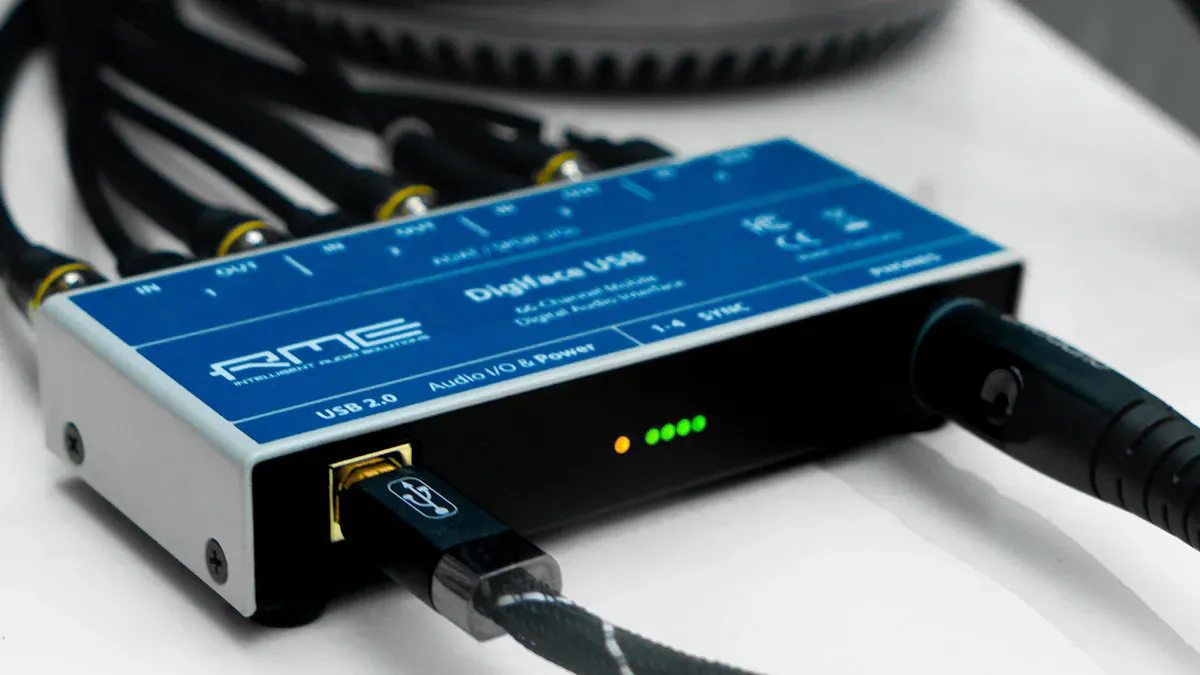
Wireless technology has changed the way audio professionals use XLR audio interfaces. Modern systems use digital transmission, frequency hopping, and automatic frequency management to deliver stable and clear audio. These technologies help prevent interference and signal dropouts, even in crowded environments. Many wireless XLR systems now offer real-time monitoring tools. Engineers can track signal strength, battery life, and frequency performance during live events.
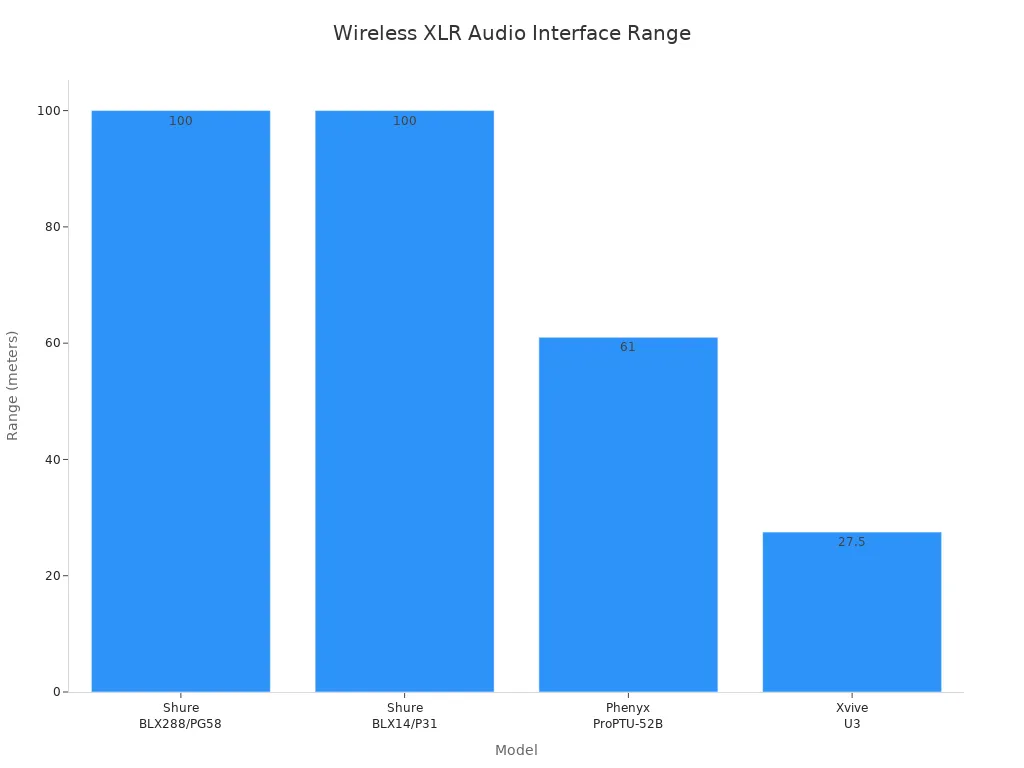
The following table compares the transmission range and reliability features of popular wireless XLR audio interfaces:
| Model | Transmission Range | Connector Type | Reliability Features | User Feedback Summary |
|---|---|---|---|---|
| Shure BLX288/PG58 | 100 meters | XLR | Frequency hopping, feedback rejection | Stable, clear audio; highly recommended for live use |
| Shure BLX14/P31 | 100 meters | 4-pin mini-XLR | Reliable setup, solid feedback rejection | Crisp, dropout-free audio even in crowded rooms |
| Xvive U3 | 27.5 meters | XLR | Ultra-low latency, simple use | Clear audio, but shorter range; good for small venues |
| Phenyx ProPTU-52B | 61 meters | XLR, 6.35 mm | 30 tunable frequencies, frequency hopping | Clear sound, stable connection, easy setup |
| Sennheiser XSW 1-835-A | Not specified | XLR | Auto-frequency management, internal antenna switching | Smooth audio in noisy environments; easy synchronization |
ROXTONE, a leader in professional audio solutions, has adopted these advanced wireless technologies in its latest XLR interface systems. Their products focus on reliability and ease of use, making them a strong choice for both live and studio applications.
Benefits of Wireless XLR Audio Interfaces
Wireless XLR audio interfaces offer many advantages for audio professionals. These benefits improve both workflow and creative possibilities:
- Wireless systems reduce cable clutter, creating cleaner and safer workspaces.
- Sound engineers and performers gain greater mobility, allowing real-time adjustments and dynamic performances.
- Setup and teardown times at events become much shorter, which increases workflow efficiency.
- Wireless technology overcomes distance limitations in large venues while maintaining reliable audio transmission.
- Frequency hopping and automatic frequency selection prevent interference and signal dropouts.
- Real-time monitoring tools help engineers manage signal strength, battery life, and frequency performance during events.
These improvements help professionals work faster and more safely. They also allow for more creative stage setups and flexible studio arrangements.
Note: Wireless XLR audio interfaces can transform event production by enabling quick changes and reducing setup stress.
Real-World Examples of Wireless XLR Audio Interfaces
Professional users have shared positive experiences with wireless XLR audio interfaces in both live and studio settings. For example, the iRig Pro Duo receives praise for its portability, dual XLR/instrument inputs, and clean preamps. Users appreciate its compatibility with devices like iPhone, iPad, Mac, and PC. When gain levels are set correctly, noise issues remain minimal. However, some users note that battery life can be a challenge, especially when using phantom power. The iRig Pro Duo runs on 9V power or batteries, with about four hours of battery life without phantom power.
Some professionals prefer wired interfaces, such as the Focusrite Saffire series, for near-zero latency and consistent sound quality during recording. The Presonus StudioLive AR8 stands out for live recording, offering SD card support and Bluetooth connectivity. Overall, feedback highlights the importance of clean preamps, low latency, and device compatibility. Wireless XLR audio interfaces like those from ROXTONE continue to improve, balancing noise control, power options, and input versatility. These features make them suitable for a wide range of professional audio tasks.
Smart Controls in XLR Audio Interfaces
App-Based Remote Management for XLR Audio Interfaces
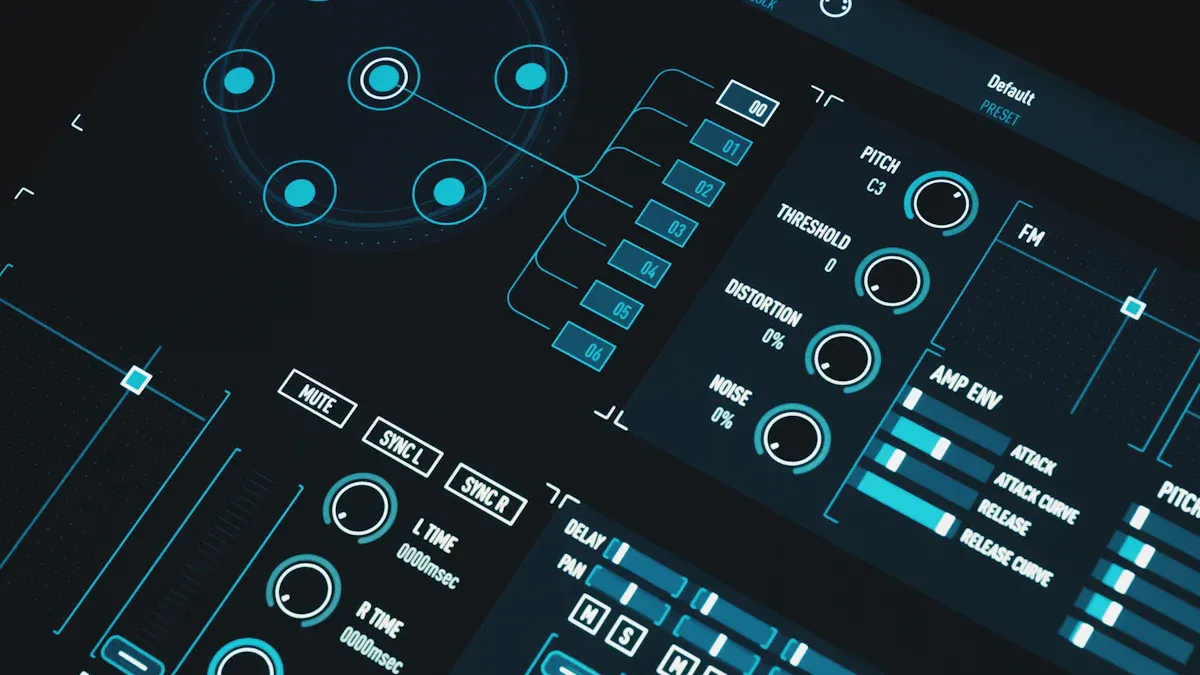
App-based remote management has become a game-changer for audio professionals. Modern solutions, such as Focusrite Control 2, allow users to adjust hardware settings from a computer or mobile device. This remote access proves especially useful when the XLR audio interface sits in a rack or out of reach during a session. Users can change gain, switch phantom power, or reroute signals without leaving their mixing position.
Virtual mixing consoles and flexible routing options help engineers make quick adjustments. These features improve workflow by reducing the need to physically touch the interface. The workspace stays organized, and cable clutter decreases. For example, ROXTONE includes app-based control in its latest XLR audio interfaces, giving users more flexibility and convenience. However, users must pay attention to software settings to maintain sound quality. App-based control brings greater efficiency, but it also requires careful management.
Tip: Use app-based remote management to save time during live events or complex studio sessions. Always double-check settings before recording.
AI-Driven Audio Optimization in XLR Audio Interfaces
Artificial intelligence now plays a growing role in audio technology. Some XLR audio interfaces use AI-driven features to optimize sound quality automatically. These systems analyze input signals and adjust gain, EQ, and noise reduction in real time. The result is a cleaner, more balanced recording with less manual intervention.
AI-driven optimization helps beginners achieve professional results. It also saves time for experienced engineers by handling routine adjustments. ROXTONE has started to explore AI-powered features in its product line, aiming to deliver consistent sound quality across different environments. AI can detect clipping, suggest optimal levels, and even adapt to changing room acoustics. This technology reduces the risk of errors and improves the overall recording experience.
- AI features can:
- Automatically set input gain for microphones.
- Reduce background noise and hum.
- Suggest EQ settings based on the source material.
- Adapt to different room conditions.
Note: While AI-driven tools offer convenience, users should still monitor recordings to ensure the best results.
DAW and Software Integration with XLR Audio Interfaces
Seamless integration with digital audio workstations (DAWs) and software is essential for modern audio production. XLR audio interfaces must connect reliably to computers and work smoothly with popular DAWs. The integration process involves several steps:
1. Install the correct drivers for the interface. 2. Connect the interface directly to the computer using USB or Thunderbolt. 3. Update firmware through the control app. 4. Assign outputs for headphones and studio monitors within the DAW. 5. Set the interface as the main input/output device in both the computer and DAW. 6. Route outputs in the DAW to match the monitoring setup. 7. Plug in microphones using XLR cables and enable phantom power if needed. 8. Test all inputs and outputs, adjusting gain before recording.
A well-integrated system allows for direct monitoring, which helps performers hear themselves in real time. This reduces latency and keeps recordings in sync. Users sometimes face challenges, such as timing issues or latency. These problems often result from buffer size settings or older connection types. Solutions include lowering the buffer size, using direct monitoring, and keeping drivers up to date.
| Feature | Description |
|---|---|
| Microphone Input | XLR or combo connectors with preamps and phantom power for condenser mics. |
| Line Input | TRS connectors for line-level devices, sometimes switchable with mic inputs. |
| Instrument Input | High-impedance TS or combo inputs for guitars and basses. |
| Headphone Output | 1/4" TRS output with volume control. |
| Monitor/Speaker Outputs | Stereo XLR or TRS outputs for studio monitors. |
| Computer Connection | USB or Thunderbolt ports for fast data transfer. |
| MIDI Input/Output | 5-pin DIN connectors for MIDI devices, available on some models. |
ROXTONE designs its XLR audio interfaces to support easy DAW integration, offering robust drivers and bundled software. Users benefit from features like direct monitoring, multiple outputs, and high-quality preamps. These features help reduce latency and improve workflow.
- When choosing an interface, consider:
- The number of XLR inputs needed.
- MIDI support for external devices.
- High-quality preamps for clean sound.
- Support for high-resolution audio.
- Compatibility with your operating system.
- Features that reduce latency.
- Multiple headphone outputs for flexible monitoring.
- Included software and plugins.
- Durable build quality.
- Reliable USB or Thunderbolt connectivity.
Callout: Always test your setup before a session. Adjust buffer size and use direct monitoring to avoid timing issues.
Technical Challenges for XLR Audio Interfaces
Latency and Audio Quality in Wireless XLR Audio Interfaces
Wireless XLR Audio Interfaces face several technical hurdles. Latency remains a top concern. When audio travels wirelessly, even a small delay can disrupt live performances or studio sessions. High-quality audio demands fast and stable transmission. Manufacturers must balance speed with sound clarity. Advanced wireless systems use digital transmission and frequency management, but these features increase cost and design complexity. Many users expect near-zero latency, which pushes engineers to innovate. The need for miniaturization and portability adds another layer of difficulty.
- High cost of advanced interfaces limits adoption.
- Setup complexity and latency affect user experience.
- Integration of smart audio processing increases design challenges.
- Competition from built-in audio solutions reduces demand.
Interference and Signal Reliability for XLR Audio Interfaces
Signal reliability is critical for professional audio. Wireless systems must resist interference from other devices and maintain clear sound. Balanced audio transmission helps cancel out noise. The metal housing of XLR connectors shields against electromagnetic and radio frequency interference. Locking mechanisms prevent accidental disconnections. Gold-plated contacts and strain relief features protect cables and maintain conductivity. These design choices help ensure stable connections, but wireless environments still present risks.
Tip: Always test wireless setups in the actual environment to identify possible interference sources.
Compatibility and Security in XLR Audio Interfaces
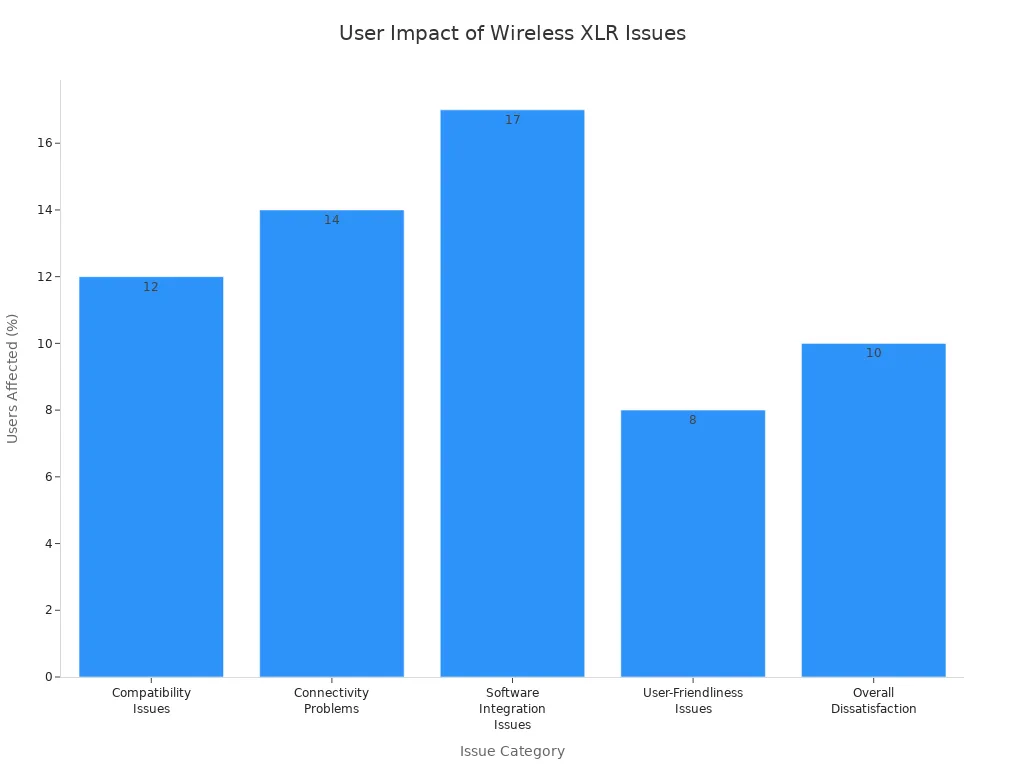
Compatibility issues slow the adoption of new wireless audio interfaces. Many users report problems with older operating systems, uncommon DAWs, or the need for extra adapters. Software integration can require extra configuration, which frustrates less technical users. The following table shows how these issues affect user satisfaction:
| Issue Category | Percentage of Users Affected | Description |
|---|---|---|
| Compatibility Issues | 12% | Problems with older OS, uncommon DAWs, requiring adapters/software, increasing cost and complexity |
| Connectivity Problems | 14% | Occasional disconnections and cable issues affecting stability |
| Software Integration Issues | 17% | Difficulties with DAWs and extra configuration needed |
| User-Friendliness Issues | 8% | Setup difficulties, driver installation problems, limiting accessibility for less technical users |
| Overall Dissatisfaction | 10% | Cited compatibility and durability as key concerns impacting product appeal |
Security also matters. As more devices connect wirelessly, protecting audio data from unauthorized access becomes important. Manufacturers must address these risks while keeping systems easy to use.
Practical Impacts for Audio Professionals Using XLR Audio Interfaces
Workflow Transformation and Efficiency with XLR Audio Interfaces
Wireless and smart audio interfaces have changed daily workflows for many professionals. Users now enjoy faster setups and less equipment clutter. Many devices integrate a second microphone or instrument input directly into the microphone body, which removes the need for extra hardware. Built-in DSP and automatic input detection help optimize sound quality and make recording easier. Features like Auto Level Mode with SmartGate technology manage gain and reduce crosstalk, which improves multi-user recording. USB-C output supports a wide range of devices, including Mac, Windows, and mobile platforms. Apps such as MOTIV Mix allow for custom control, multi-track recording, and flexible routing. Real-Time Denoiser and Digital Popper Stopper features help reduce unwanted noise and plosives. These improvements let users focus more on creativity and less on technical setup.
Expanding Creative Possibilities in XLR Audio Interfaces
New smart interfaces open up creative options for podcasters, musicians, and content creators. Devices like the MV7i allow two-channel recording without a separate interface, which is ideal for podcasting with guests or tracking vocals and instruments at the same time. The microphone’s input supports high-demand microphones and offers up to 60dB gain. USB connectivity with headphone monitoring on the mic itself creates a compact and portable solution. Advanced DSP features, such as real-time denoising and adjustable reverb, support a variety of recording environments. Seamless control through desktop and mobile apps, along with DAW compatibility, gives users flexibility in any setting. The simplified design reduces costs and setup time, so professionals can spend more energy on content creation.
Adoption Considerations and Training for XLR Audio Interfaces
Transitioning to advanced audio interfaces requires thoughtful training and adoption strategies. Teams benefit from starting with basic skills before moving to complex scenarios. Hands-on practice during non-service times helps build confidence. Clear documentation, including step-by-step guides and visuals, supports learning and troubleshooting. Assigning roles based on individual strengths creates a balanced team. Training should focus on core audio skills, such as soundboard operation, microphone techniques, feedback management, and EQ adjustments. Understanding the full audio, visual, and lighting system enables better coordination. These strategies help reduce technical issues and improve team engagement.
Future Trends in XLR Audio Interfaces
Emerging Technologies in XLR Audio Interfaces
Manufacturers continue to push the boundaries of audio technology. They introduce new features that improve sound quality, flexibility, and reliability. The table below highlights several promising advancements expected to shape the next generation of interfaces:
| Emerging Technology / Feature | Description and Impact on Next-Gen XLR Interfaces |
|---|---|
| Next-generation 32-bit/192 kHz converters | Provide high dynamic range (up to 120 dB) and clarity for detailed, punchy recordings and monitoring. |
| Ultra-low noise SSL-designed microphone preamps | Offer 64 dB gain range and 116.5 dB dynamic range, delivering detailed, punchy sound with low noise, suitable for professional use. |
| Legacy 4K Analogue Enhancement circuit | Adds harmonic distortion and high-frequency EQ boost inspired by SSL 4000 series consoles, imparting analog warmth and character. |
| MIDI I/O and DC-coupled balanced outputs | Enable control voltage (CV) output for modular synth integration and MIDI connectivity, expanding creative and performance options. |
| Stereo loopback feature | Supports content creators and streamers by allowing easy routing of audio streams for live production and collaboration. |
| Dual high-current headphone outputs | Provide independent volume control and zero-latency monitoring, enhancing monitoring flexibility for artists and producers. |
| Robust construction and professional-grade components | Use Neutrik combi XLR/jack connectors and Alps pots for durability and reliability in professional environments. |
| Bundled SSL Production Pack software | Includes virtual instruments, effects, and DAWs to complement hardware, enhancing creative possibilities and workflow. |
These innovations promise to deliver higher fidelity, more creative control, and better integration with modern production environments.
Preparing for Next-Generation XLR Audio Interfaces
Manufacturers and professionals both prepare for the future by focusing on expandability, real-time processing, and robust build quality. The following table shows how leading products address these needs:
| Audio Interface | Key Features | Unique Characteristics |
|---|---|---|
| Focusrite Scarlett 18i8 3rd Gen | 4 XLR/line inputs, ADAT expandability, Air Mode | Versatile with ADAT expansion for future growth; Air Mode mimics classic ISA preamps for polished sound |
| Behringer U-Phoria UMC404HD | 4 XLR/TRS combo inputs, MIDAS-designed preamps | Budget-friendly with professional-grade MIDAS preamps; durable metal chassis for portability |
| Audient iD44 | 4 XLR inputs with Class-A preamps, dual ADAT ports | Premium console-grade preamps; dual ADAT for expansion; ScrollControl for DAW control |
| TASCAM US-4x4HR | 4 XLR/TRS combo inputs, high-res audio (24-bit/192kHz), low-latency drivers | High-resolution audio; ergonomic design; low-latency performance for smooth recording |
| Universal Audio Apollo x4 | 4 XLR inputs, UAD real-time plugin processing, Thunderbolt 3 connectivity | Real-time UAD processing with zero latency; elite AD/DA conversion for studio-grade audio quality |
Audio professionals can take several steps to maximize the benefits of these advanced interfaces:
- Use high-quality XLR cables to prevent noise and signal degradation.
- Monitor input levels carefully to avoid distortion or weak signals.
- Keep interface drivers and software updated to ensure optimal performance.
- Experiment with unique sound settings or modes to enhance recording quality.
Manufacturers also design interfaces for compatibility with popular DAWs and ensure low-latency drivers for both Mac and Windows. Expandability through ADAT inputs allows users to grow their setups as their needs evolve.
Wireless integration and smart controls drive innovation in audio technology. Professionals benefit from reduced cable clutter, improved mobility, and streamlined workflows. Key challenges include latency, compatibility, and training needs. To stay ahead, audio teams should:
- Embrace new features and eco-friendly designs.
- Standardize workflows and invest in ongoing education.
FAQ
What are the main benefits of wireless XLR audio interfaces?
Wireless XLR audio interfaces provide greater mobility, faster setup, and less cable clutter. They help audio professionals work more efficiently in both live and studio environments.
How do smart controls improve workflow for audio engineers?
Smart controls allow remote adjustments, real-time monitoring, and automatic audio optimization. Engineers save time and reduce manual errors during recording or live events.
Are wireless XLR audio interfaces secure from interference?
Most wireless XLR interfaces use frequency hopping and shielding. These features protect signals from interference and keep audio transmission stable.
By: Roxtone
Tel: +86 574 87154705
Fax:+86 574 56138190
E-mail: [email protected]
Facebook: Roxtone
Youtube: Roxtone
X: Roxtone